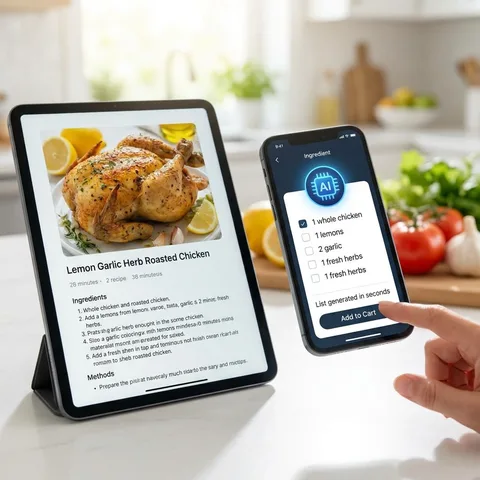
Turn any photo into a shopping list
You already write lists on paper, snap fridge photos, or save receipt photos “for
later.” SnapList’s photo import closes that gap: take a picture of a handwritten
list, a printed meal plan, or even a crowded receipt, and AI reads the text and
pulls out individual items.
The workflow is built for real life. Open the camera from your list, capture the
image, and wait a few seconds while SnapList analyzes it. You’ll see every
detected item in a review screen — rename “tom” to “tomatoes,” drop duplicates, or
add anything the scan missed — before confirming the import.
Best for: migrating an old paper list, copying a shared
whiteboard at home, or digitizing a receipt so you remember what to rebuy next
week.
Tip: Good lighting and a flat angle help the reader catch small
handwriting. If a photo is very large, compress it or crop to the list area for
faster results.
Hands-free list building while you cook
Your hands are covered in flour, you’re buckling a kid into a car seat, or you’re
walking the dog — typing a list isn’t an option. Voice input lets you speak
naturally: “two liters of milk, a dozen eggs, and bread if they have sourdough.”
SnapList transcribes what you say, then AI splits it into separate shopping items
and assigns categories so milk lands in dairy and bread in bakery. Like every AI
import, you review the breakdown before adding — so “bread if they have sourdough”
becomes one clear line, not three confused entries.
Best for: adding items while cooking, driving (safely, when
parked), or when your phone is across the room.
Tip: Pause briefly between items. Saying quantities out loud
(“three cans of tomatoes”) helps the AI get amounts right on the first try.
Paste a recipe — get a store-ready list
Recipe blogs, WhatsApp messages, and Notes app dumps don’t need to become a manual
chore. Paste any block of text — ingredients, a meal-prep plan, or a bulleted
shopping note — and SnapList’s smart extraction finds product names and
quantities.
The AI understands messy formatting: dashes, numbers, “1/2 cup,” and mixed
languages in one paste. Each line becomes a candidate item with a suggested
category, ready for your approval. That means a long Shabbat dinner list or a
Thanksgiving spreadsheet can land on your phone in seconds instead of twenty
minutes of typing.
Best for: copying from email newsletters, shared family docs, or
screenshots you’ve already OCR’d elsewhere.
Tip: Paste only the ingredient section when possible — less noise
means fewer lines to delete in review.
From dish idea to ingredient list in minutes
Want to make shakshuka or chocolate chip cookies but don’t have a recipe saved?
Describe the dish in plain language and SnapList searches the web for matching
recipes. You pick the source you trust, and the app pulls the ingredient list into
your review flow.
Imported items keep a link back to the recipe, so when you’re at the store
wondering how much paprika you need, one tap takes you to the original page.
Ingredients are categorized automatically — produce separate from pantry — so you
can shop efficiently even for a dish you’ve never cooked before.
Best for: trying new meals without maintaining a recipe box app,
or planning dinner when someone texts “come over, I’m cooking pasta.”
Tip: Be specific in your search (“creamy mushroom pasta”) rather
than vague (“pasta”) to get better recipe matches on the first attempt.
Shop aisle by aisle, not line by line
A flat checklist forces you to zigzag across the store. SnapList groups items into
30+ categories — fruits and vegetables, dairy, bakery, frozen, household, and more
— so your list follows the layout of a typical supermarket.
AI assigns a category when you add an item by voice, photo, or text. You can
always override with a tap if you’d rather keep tomatoes in “vegetables” than
“fruit.” Reorder categories to match your local store’s floor plan, collapse
sections you’ve finished, and filter when you only want to see what’s left in
produce.
Best for: big weekly shops where walking back and forth costs
time and patience.
Tip: After a few shops, adjust category order once — most stores
stay consistent, and your list will feel custom-tailored.
One list, whole household — updated live
Shared shopping breaks when two people use different apps — or worse, a photo of a
list in the family chat. SnapList lets you invite partners, roommates, or family
with a link. Everyone sees the same list in real time on their own phone.
Add milk from the couch; your partner checks it off at the store. No refresh
button, no “which version is newer?” Cloud sync keeps items, categories, and
checked states aligned. You can mute notifications per list when you want peace,
but still stay synced when you open the app.
Best for: couples splitting errands, parents and teens, or
roommates sharing household supplies.
Tip: Agree on one “master” weekly list name so invites don’t
splinter across three similarly named lists.
You stay in control before anything is added
AI is fast, but your kitchen isn’t a guessing game. Every photo, voice, text, and
recipe import ends in a review screen: a clear summary of what will be added, what
might be a duplicate, and what you can edit or discard.
That design choice matters. SnapList won’t silently dump twenty wrong items on
your list because the camera misread cursive. You approve the batch, fix a typo,
or cancel entirely. Duplicates are flagged when an item already exists, so “milk”
doesn’t become “milk” three times after three imports.
Best for: anyone who’s been burned by “smart” apps that felt dumb
after the fact.
Tip: Treat review like proofreading — ten seconds now saves a
confused trip down the wrong aisle later.
Weekly milk without retyping it every Friday
Some items aren’t one-off purchases — they’re rhythm. SnapList supports recurring
items that reset on a schedule: weekly, every two weeks, or a custom number of
days. Check off eggs on Sunday; they reappear on your unchecked list when the
cycle says it’s time again.
Pair that with your usual shop flow: check off what you bought, mark anything the
store didn’t have as missing, and it stays on the list for the next run instead of
vanishing because you checked it off in frustration.
Together, recurring items and missing-item tracking turn SnapList from a static
notepad into something that remembers how your household actually shops.
Best for: staples like diapers, coffee, pet food, or trash bags
you buy on autopilot.
Tip: Start with five true staples on recurrence — too many resets
feel noisy until you trust the timing.
Prices, photos, and notes on every product
A name on a list is enough for milk. For everything else, open item details: add a
price in your currency, attach a photo from the camera or gallery, paste a product
link, and leave a note (“the green cap, not blue”).
Prices roll up so you can see roughly what this trip might cost before you leave.
Photos help partners buy the right package when brands look alike. When something
isn’t on the shelf, mark it missing — it stays visible for the next store or next
week, instead of disappearing because you checked it off in frustration.
Need a paper copy? Export unchecked items to PDF, grouped by category — handy for
delegating a run to someone who prefers print, or sticking a list on the fridge.
Checklist mode offers a simpler linear view when categories aren’t the point.
Best for: budget tracking, picky brands, and shared errands where
details prevent “you got the wrong one” texts.
Unlimited AI, themes, and an ad-free experience
SnapList is free to start: multiple lists, generous AI trials, and core
collaboration. Pro is for households that live in the app — unlimited photo,
voice, text, and recipe imports; unlimited lists and items; and no ads
interrupting your shop.
Pro also unlocks 25+ premium themes, from calm ice and forest palettes to bold
synthwave and cyberpunk, plus a custom theme builder to match your mood or brand
colors. High-contrast and RTL-friendly layouts stay available so the app works in
Hebrew, English, and mixed-language homes.
Best for: power users importing recipes every week, large
families with many shared lists, or anyone who wants the app to feel personal
without limits.
Tip: Use the free tier until you hit a limit you actually feel —
then Pro pays for itself in saved typing time alone.
Mark what the store didn’t have
Sometimes the shelf is empty — not your fault, but easy to forget on the next
trip. Mark an item as missing instead of checking it off. It
stays on your list, clearly separated, so you remember to grab it elsewhere or
come back next week.
Swipe halfway on an item to open quick actions, or use item details to toggle
missing. Missing items don’t count as “done,” and they won’t clutter your PDF
export of what you still need to buy.
Best for: out-of-stock staples, seasonal products, or specialty
items your regular store doesn’t always carry.
Tip: After a big shop, scan the missing section once — it’s your
“try again” list for the next run.
Category view or a simple checklist
SnapList has two ways to shop the same list. Category mode groups
items into produce, dairy, household, and 30+ other aisles — ideal for a full
grocery run. Checklist mode shows one clean, linear list you tick
top to bottom, with no section headers in the way.
Turn checklist mode on or off per list from list settings — items, prices, and
photos stay exactly the same; only the layout changes. A weekly family shop might
stay in categories while a “pick up these four things” errand list lives in
checklist mode.
Checklist mode also hides category chips on each row, which keeps small lists
visually simple when aisle order doesn’t matter.
Best for: quick errands, pharmacy runs, party supplies, or anyone
who prefers one scrolling list over jumping between sections.
Tip: Start in category mode when building a big list, then switch
to checklist mode on the day of a short pickup — same data, less visual noise.
 SnapList